Showing posts with label locked. Show all posts
Showing posts with label locked. Show all posts
Wednesday, May 31, 2017
How To Unlock Pattern Security Locked itel it1453 ITEL it1501 ITEL it1502 And ITEL it1503
How To Unlock Pattern Security Locked itel it1453 ITEL it1501 ITEL it1502 And ITEL it1503
Recently I have post about how to unlock itel it1501, but so many people have fail to unlock their locked android phone.
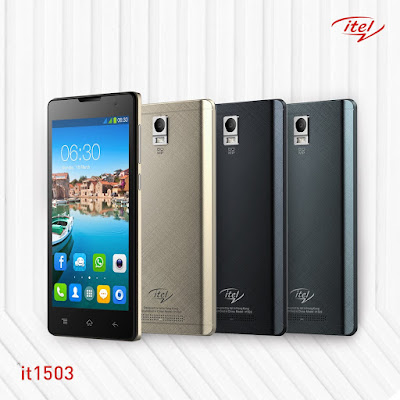
Here is the easy tutorial that will guide you to unlock your itel android phone successful, all itel from itel it1453, itel it1500, itel1501, itel it1502 and the latest itel it1503.
Firstly remove the battery of your then put it back again.
Then long press and hold the POWER KEY + VOLUME DOWN KEY together.
After it ON it will display iNote first, then after youve seen that iNote on the screen remove your hand on the phone and waait for a seconds.
It will display android recovery mode like youll see in the below picture.

Now Let go the business, to operate the recovery mode for unlocking your iTel.
Press Volume down key again to scroll down on WIPE DATA/FACTORY RESET like in the picture below.
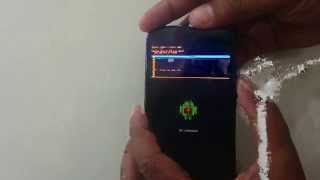
Press or Use the Power key as OK to scroll down by using volume down key also.
Press power key again as OK.
Then scroll down to YES----DELETE ALL USRE DATA.
Use power key again as OK.
After that click on REBOOT SYSTEM NOW.
Now Cogratulation youve successful unlock your locked itel android smartphone 100% without using any softwares or tools.
Incase if you got any problem added my number 08067611897 via whatsapp messenger for more help.
Please share this info to your friends.
Available link for download

Sunday, April 16, 2017
How To Hard reset Remove Gionee M2 And Gionee M3 Pattern Locked
How To Hard reset Remove Gionee M2 And Gionee M3 Pattern Locked
Hi, Guys Do you want to remove pattern/security on your Gionee M2 and Gionee M3 android device to its original state? Don’t go to the mobile repair shop, Yes you can do this yourself.

Go through the below methods to unlocked/remove the pattern of your Gionee M2 and Gionee M3 android device.
- Watch Over 2,000 Free Dstv Channels on All Android & BB10 Phones
- How To Format/Hard Reset Tecno F5 Android Phone, Pattern Lock Problem
1. Switch off your device using Power Button.
2. PressVolume Down +Power button for a couple of some seconds.
3. Release pressed keys when you see an Android Recovery Mode.
2. PressVolume Down +Power button for a couple of some seconds.
3. Release pressed keys when you see an Android Recovery Mode.

4. Select the “Wipe data / Factory reset” by using theVolume buttons and press the Power key for confirmation.
5. Then choose “Yes–delete all user data“. UseVolume Down to scroll and Power button to select.
6. To restart the phone, select “reboot system now“.
7. Now youve Done!
- You Can Also Read More About All Android Device
Congratulation your phone has been successful unlocked without using any third party softwares.
If youve getting any problem you cantact us or drop your comment below.
You can also added me via Whatsapp messenger through this number +2348067611897 for more help.
If youve getting any problem you cantact us or drop your comment below.
You can also added me via Whatsapp messenger through this number +2348067611897 for more help.
Available link for download
Thursday, April 6, 2017
Unlock Pattern Security Locked on iTel 1505 it1506 it1507 and it1508
Unlock Pattern Security Locked on iTel 1505 it1506 it1507 and it1508
Do you know the iTel android also have specific key combo for booting into recovery mode which is mostly needed whenever we need to factory reset or hard reset the phone. Here, I would discuss how to put your iTel 1505 android device in recovery mode for factory reset, soft format or for enabling USB Debugging on the iTel android phone even when the pattern is locked or password restricted.

Because iTel androids are SpreadTRUM androids, they have slightly different methods compare to other android devices like HTC, Sansung, Tecno amongst others which have specific key combo for booting into recovery mode from which you can perform a hard reset, factory reset, wipe user data or clean format the iTel android, itel it1506 to be specific.
How to Boot iTel 1505 to Recovery Mode and Hard Reset or Wipe
1. Power Off your iTel 1505,it1506, it1507 and it1508: either by removing the battery from the phone or by powering it off normally, the first thing you need to do is just power off the phone.
2. Press And Hold the Power Button for about 3 Seconds.
NOTE: Some iTel androids such as the iTel it1502 volume button should be pressed for up to 15 seconds at this stage.
2. Press And Hold the Power Button for about 3 Seconds.
NOTE: Some iTel androids such as the iTel it1502 volume button should be pressed for up to 15 seconds at this stage.
3. While Still Holding the Power Button, press and hold Volume Down (Volume -) Buttion for about 3 Seconds.
I.E Now, you should be pressing both Volume Down + Power Buttons together.
4. Now, release both buttons i.e Power Button and Volume Down button at once.
4. Now, release both buttons i.e Power Button and Volume Down button at once.
5. Shortly after releasing both buttons, an android icon shhould appear on your iTel 1505 screen. Now, press the Volume Up (Volume +) button.
If You Doesnt understand Watch this video now.
NOTE:
1. Use the Volume-up to navigate up.
2. Use the Volume-down to navigate down.
3. The Power button to select.
4. This methods have only been used for iTel 1408, 1505,it1506, it1507 and it1508.
5. I believe the same method should work with all iTel android devices thus; for booting all of them to recovery mode.
1. Use the Volume-up to navigate up.
2. Use the Volume-down to navigate down.
3. The Power button to select.
4. This methods have only been used for iTel 1408, 1505,it1506, it1507 and it1508.
5. I believe the same method should work with all iTel android devices thus; for booting all of them to recovery mode.
For more info about this tutorial just contact me direct via my whatsapp number...+2348067611897...
Available link for download
Subscribe to:
Posts (Atom)