Showing posts with label itel. Show all posts
Showing posts with label itel. Show all posts
Wednesday, May 31, 2017
How To Unlock Pattern Security Locked itel it1453 ITEL it1501 ITEL it1502 And ITEL it1503
How To Unlock Pattern Security Locked itel it1453 ITEL it1501 ITEL it1502 And ITEL it1503
Recently I have post about how to unlock itel it1501, but so many people have fail to unlock their locked android phone.
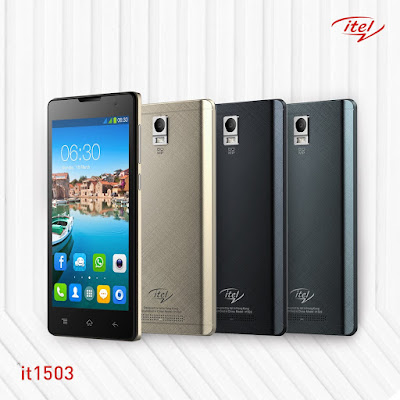
Here is the easy tutorial that will guide you to unlock your itel android phone successful, all itel from itel it1453, itel it1500, itel1501, itel it1502 and the latest itel it1503.
Firstly remove the battery of your then put it back again.
Then long press and hold the POWER KEY + VOLUME DOWN KEY together.
After it ON it will display iNote first, then after youve seen that iNote on the screen remove your hand on the phone and waait for a seconds.
It will display android recovery mode like youll see in the below picture.
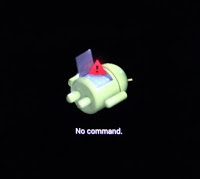
Now Let go the business, to operate the recovery mode for unlocking your iTel.
Press Volume down key again to scroll down on WIPE DATA/FACTORY RESET like in the picture below.
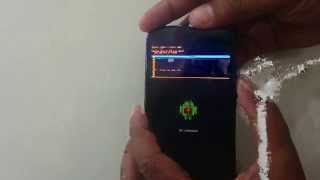
Press or Use the Power key as OK to scroll down by using volume down key also.
Press power key again as OK.
Then scroll down to YES----DELETE ALL USRE DATA.
Use power key again as OK.
After that click on REBOOT SYSTEM NOW.
Now Cogratulation youve successful unlock your locked itel android smartphone 100% without using any softwares or tools.
Incase if you got any problem added my number 08067611897 via whatsapp messenger for more help.
Please share this info to your friends.
Available link for download

Wednesday, April 19, 2017
How to Change All itel IMEI Number without Rooting Your Phone
How to Change All itel IMEI Number without Rooting Your Phone
Now to change itel smartphones imei is the easiest and currently the fastest. The most exciting aspect is that you don’t need any software or install any android app on your phone. It took me less than 1 minute to change the imei of itel inote it1502 and it1503.
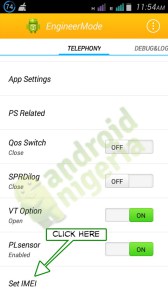
NOTE: You don’t need to root your phone to change itel imei.
Steps in Changing itel Android IMEI
- Just Dial *#*#83781#*#* on your iTel smartphone, then a screen title “Engineer Mode” would show automatically.
- Scroll Down and Select “Set IMEI“. the phone should display your IMEI(s).
- Change all or any of the IMEI being displayed with the one(s) you want and then, Click “Set IMEI“. A confirmation message will pop- up, Click OK and Reboot the Phone.
- Once the phone is rebooted, your iTEL android device IMEI should now be changed.
- To confirm that the IMEI has been successfully changed, simply dial *#06#.
This tutorial has been tested on itel inote it1502 and itel it1503 (4.4 Kitkat).
Available link for download
Wednesday, April 12, 2017
How To Unlock Pattern iTel it1505 itel it1506 and it1507 Successful
How To Unlock Pattern iTel it1505 itel it1506 and it1507 Successful
Power Off the phone or remove th e battery press power botton while holding volume down key - immediatly release power key press and hold volume down key - simultaneously now you will see android recovery logo/mode.

Then scroll down to wipe/factory reset volume down to yes /// wipe data/factory reset.
Also press volume up to reboot the device.
Congratulation youve done resetting/formatting everything on your itel smartphone.
If you need more help you can call us or whatsapp this number 08067611897.
If you need more help you can call us or whatsapp this number 08067611897.
Available link for download
Thursday, April 6, 2017
Unlock Pattern Security Locked on iTel 1505 it1506 it1507 and it1508
Unlock Pattern Security Locked on iTel 1505 it1506 it1507 and it1508
Do you know the iTel android also have specific key combo for booting into recovery mode which is mostly needed whenever we need to factory reset or hard reset the phone. Here, I would discuss how to put your iTel 1505 android device in recovery mode for factory reset, soft format or for enabling USB Debugging on the iTel android phone even when the pattern is locked or password restricted.

Because iTel androids are SpreadTRUM androids, they have slightly different methods compare to other android devices like HTC, Sansung, Tecno amongst others which have specific key combo for booting into recovery mode from which you can perform a hard reset, factory reset, wipe user data or clean format the iTel android, itel it1506 to be specific.
How to Boot iTel 1505 to Recovery Mode and Hard Reset or Wipe
1. Power Off your iTel 1505,it1506, it1507 and it1508: either by removing the battery from the phone or by powering it off normally, the first thing you need to do is just power off the phone.
2. Press And Hold the Power Button for about 3 Seconds.
NOTE: Some iTel androids such as the iTel it1502 volume button should be pressed for up to 15 seconds at this stage.
2. Press And Hold the Power Button for about 3 Seconds.
NOTE: Some iTel androids such as the iTel it1502 volume button should be pressed for up to 15 seconds at this stage.
3. While Still Holding the Power Button, press and hold Volume Down (Volume -) Buttion for about 3 Seconds.
I.E Now, you should be pressing both Volume Down + Power Buttons together.
4. Now, release both buttons i.e Power Button and Volume Down button at once.
4. Now, release both buttons i.e Power Button and Volume Down button at once.
5. Shortly after releasing both buttons, an android icon shhould appear on your iTel 1505 screen. Now, press the Volume Up (Volume +) button.
If You Doesnt understand Watch this video now.
NOTE:
1. Use the Volume-up to navigate up.
2. Use the Volume-down to navigate down.
3. The Power button to select.
4. This methods have only been used for iTel 1408, 1505,it1506, it1507 and it1508.
5. I believe the same method should work with all iTel android devices thus; for booting all of them to recovery mode.
1. Use the Volume-up to navigate up.
2. Use the Volume-down to navigate down.
3. The Power button to select.
4. This methods have only been used for iTel 1408, 1505,it1506, it1507 and it1508.
5. I believe the same method should work with all iTel android devices thus; for booting all of them to recovery mode.
For more info about this tutorial just contact me direct via my whatsapp number...+2348067611897...
Available link for download
Thursday, March 23, 2017
How to Change MTK Androids’ IMEI Tecno iTel Infinix And Others
How to Change MTK Androids’ IMEI Tecno iTel Infinix And Others
When we are talking of MTK Androids, we are talking about Tecno, Infinix, Oppsson, iTel and other ported MTK android devices (Nigerians refer to them as China androids).
In this tutorial, we will be discussing how to change your MTK android device’s IMEI to a Blackberry device’s IMEI to enable you use some networks’ BIS (Blackberry Internet Service) on your MTK androids.
In this tutorial, we will be discussing how to change your MTK android device’s IMEI to a Blackberry device’s IMEI to enable you use some networks’ BIS (Blackberry Internet Service) on your MTK androids.

How Does it Work?
You might be wondering how it works or maybe changing the IMEI has any adverse effects on your MTK android. Below is the answer that solves such curiousity. Changing the IMEI makes the phone appears to most network providers as a Blackberry device and as a result of this, all Blackberry Internet Services are made available for the phone.
The ONLY effect it (Changing of IMEI) has on phones is that it turns your android phone to a Blackberry by identity. All the functionalities of your android device remains the same.
How to Change MTK Androids IMEI to A Blackberry Device IMEI
This tutorial explains how to change your MTK android IMEI to a Blackberry (Or, any device IMEI) using MTK Engineering MOD, downloadable from the Google PlayStore.
1. Download MTK Engineering Mode now.
2. Open/Lunch the MTK Engineering Mode on your phone.
3. Click/Select MTK Settings.
4. Navigate left to Connectivity.
5. On the connectivity panel, select CDS Information.
6. On the CDS section, select Radio Information.
7. Now, select either the SIM1 or SIM2, depending on which ever SIM you wish to change its IMEI.
8. On this page, click on theAT . About four (4) options should be presented to you, just choose either of this options below: AT EGMR=1,10,”” -for SIM 2 AT EGMR=1,7,”” -for SIM 1 Don’t forget to put the IMEI you wish to change to in- between this signs“”above.
9. Now, tap/click the Send AT Command option.
You can now enjoy better and cheaper internet access on your MTK android devices using the Blackberry BIS.
You can now enjoy better and cheaper internet access on your MTK android devices using the Blackberry BIS.
Share this to your friends also added me on whatsapp messenger with my number : 2348067611897...
Available link for download
Easy Way To Unlock iTel it1507 it1507 and iTel it1702 Pattern Lock Without Using any Softwares
Easy Way To Unlock iTel it1507 it1507 and iTel it1702 Pattern Lock Without Using any Softwares
Assalam alaikum, Still I want to talk about iTel smartphones because I still recieve many complain in my facebook inbox and my mail box all about iTel unlocking. Many of the people are coming with security and pattern problem that is on itel smartphone.
So, today I still find a little time for helping my blog readers that are coming from various country in African continent, from Nigeria, Kenya, Tanzania, Ghana, Gambia, Zimbabwe, Somalia etc.
- Firstly switch OFF your itel phone
- Then Press the POWER KEY first and VOLUME DOWN KEY at thesame time.
- Within a second the iNOTE will display on your phone screen.
- Now Quick and release all the keys you held and leave the phone.
- You will see something like this "No Command." see the picture below.
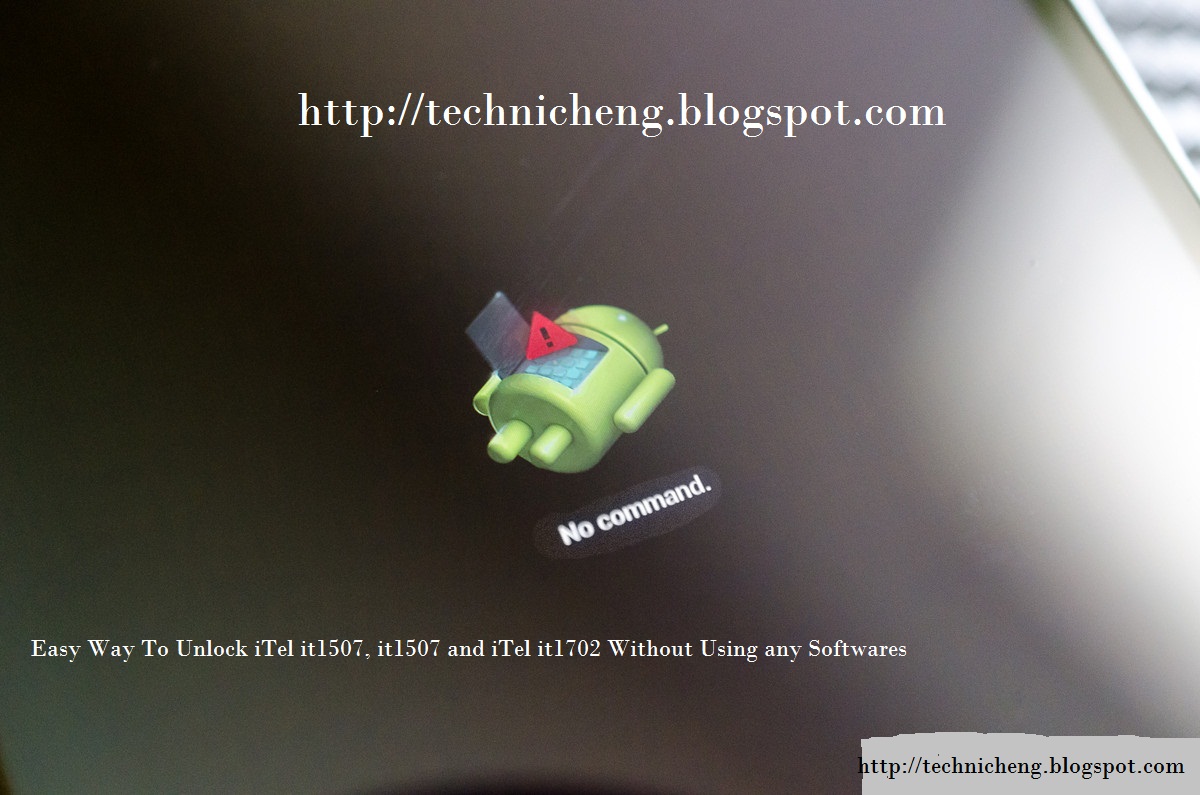
Now the recovery mode were display on the above photo.
Press the "VOLUME UP key" for iTel it1507 and it1506 you will see something like this in the picture below.
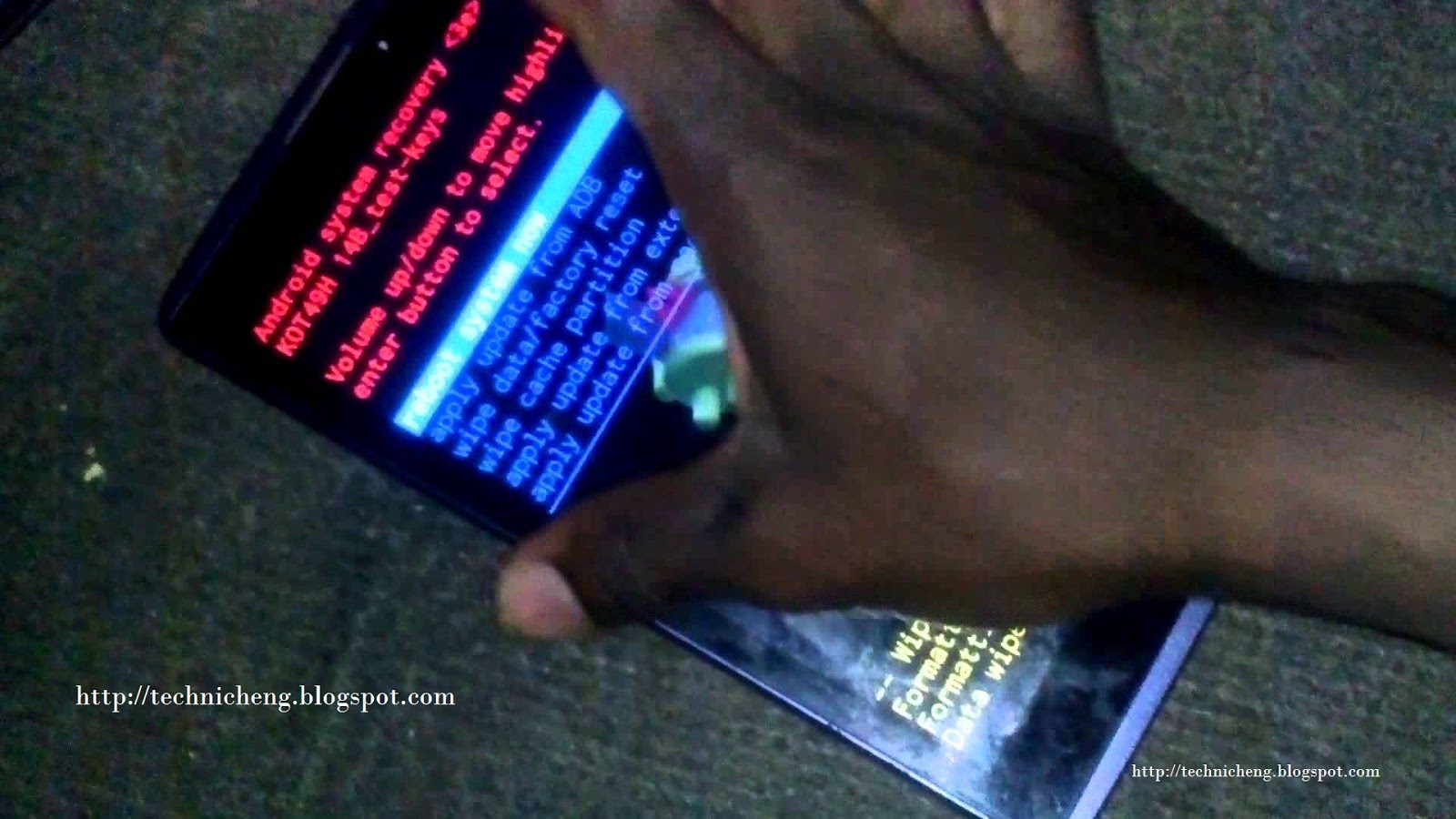
Now press Volume Down Key to scroll down on "WIPE DATA/FACTORY RESET" and press Power Key.
Now the formatting and Wiping data will start and wait for 1 - 2mins.
Press Power again on "REBOOT SYSTEM NOW"
Congratulation youve done resetting/formatting everything on your itel smartphone.
NOTE: This method normally work on few itel device like itel it1501, it1502, it1503, it1505, it1506, it1507, it1701 and it1702.
Hope this will help you guys and some students for unlocking your itel android phone, some that they dont have enough money to and unlock, you can use this tutorial working 100%.
If you can added this number +2348067611897 on your whatsapp contact for more help.
Available link for download
Thursday, March 16, 2017
How to flash unbrick or upgrade spreadtrum devices like iTel it smartphone
How to flash unbrick or upgrade spreadtrum devices like iTel it smartphone
Some you know tha the Flashing is the process of reverting your iTel android device to its factory defaults by means of flashing STOCK iTel firmware on it. Or, by means of flashing Custom ROM/Firmware on it. Flashing is done to correct any software malfunctions experienced on any iTel android devices.
Even those that seem persistence after performing a Factory-Reset would be corrected by flashing the iTel android device.
DEFINITIONS OF TERMS USED Before we begin the flashing exercise, let us do a bit of introduction by introducing ourselves to the terms to be identified while flashing iTel android.
OS VERSION: this refers to the version of the firmware for which you have and that that you are going to use to flash the iTel android device.

MODEL VARIANTS: usually, there are different variant (s) of some iTel android devices as in the case of iTel 1351 E, 1351 , 1352 and itel 1353 .
HOW CAN YOU KNOW THE DIFFERENT VARIANTS OF iTel ANDROID DEVICE?
For iTel android device, its simple. By simply checking the label behind the battery seat on the phone or by navigating to Settings >> About >> section of the phone, you can see detailed information about the phone.
FIRMWARE: iTel firmware is usually compressed and packed in a compressed file known as .PAC. This file, when flashed on iTel android devices, contains all the images, GUI and the entire files necessary to run android OS on your iTel android device and other SpreadTRUM android devices parked in similar format.
Flashing can upgrade or downgrade your iTel android device. It all depends on the versions of the firmware you used while flashing the phone.
HOW TO FLASH iTEL SPD ANDROID PHONE USING SpreadTRUM FLASH TOOL
Download the specific firmware for the iTEL android device from the link below.
Download all itel Pac file here
Open the SpreadTRUM Flash Tool you downloaded from the link above. It is compressed in a zip file, simply extract it onto a folder on your PC, open the folder to locate the SpreadTRUM Upgrade Tool application and then; double-click it to lunch the program. See the image below:

Remember to install the SpreadTRUM Android Drivers following the normal Windows Drivers installation procedures.
- Must Read: Learn how to install SPD USB Drivers on your PC.
Switch off your iTel android device and then, connect it to your PC.
Now, select the specific STOCK FIRMWARE you downloaded for your iTel android device by clicking on the Select Pack icon. See the image below.

As soon as the file is loaded successfully, click on "Download Button" to commence the flashing operation.

Becarefull: During the flashing operation, your phone may reboot once or twice. Just leave it and do not interrupt the operation.
Once the flashing operation is successfully completed, you will see "Previous Passed" message displayed in green on the SpreadTRUM Flash Tool.

NOTE: For better understanding Watch This Video below.
CONGRATULATIONS! You have now successfully flashed your iTel android device.
Please help the blog Admin for sharing this post to your firends social media, also tell your friends about us.
If you need any help concerning this tutorial you can Contact Us or drop your comment.
Still you can also add my number to your whatsapp contact 08067611897.
Available link for download
Wednesday, March 1, 2017
iTel it1556 Full Specifications Price with 5000mAh Battery Capacity
iTel it1556 Full Specifications Price with 5000mAh Battery Capacity
The iTel it1556 launched, Dont be tethered to an outlet anymore. You have the flexibility to chat, snap and watch for longer with no worry. The crisp, colorful 5.5" ample screen of it1556 is such a comfort to your eyes whether youre editing or viewing photos and videos or surfing the web.
it1556 can be used as a power bank to charge other mobiles and tablets via microUSB.

Power bank function
The iTel it1556 SECSTechnology
GSM: GSM 900 / 1800
3G: HSDPA 900 / 1800 / 2100
4G: No
SIM Type: Dual SIM
OS: Android 5.1 Lollipop
DesignDimensions: 156 x 79.3 x 9.9 mm
Weight: g
Display: 5.5 inches, 480 x 854 pixels ( PPI) IPS display
Sensors: Accelerometer, Proximity
Build: Plastic
Colours: Black

HardwareProcessor Type: Quad-Core 1.2 GHz
Processor Name: Mediatek
Graphics Processor:
RAM: 512 MB
Internal Storage: 8 GB
External Storage: MicroSD card up to 32 GB
CameraRear: 5 megapixel autofocus camera with LED flash
Video recording: Yes
Front-facing: 2 megapixel camera
MultimediaMusic Support: mp3, aac, aac+, eaac+, amr
Loudspeaker: Mono
Video Support: mpeg4, h.263, h.264
FM Radio: Yes
ConnectivityBluetooth: v2.1
WiFi: Wi-Fi 802.11 b/g/n, Wi-Fi Direct, hotspot
GPS: Yes
USB: microUSB v2.0; OTG
MiscellaneousCharging: Fast Charge
Battery: 5000 mAh
Announcement: July 2016
Availability: July 2016
Launch Price: N20,000
it1556 can be used as a power bank to charge other mobiles and tablets via microUSB.
Power bank function
The iTel it1556 SECSTechnology
GSM: GSM 900 / 1800
3G: HSDPA 900 / 1800 / 2100
4G: No
SIM Type: Dual SIM
OS: Android 5.1 Lollipop
DesignDimensions: 156 x 79.3 x 9.9 mm
Weight: g
Display: 5.5 inches, 480 x 854 pixels ( PPI) IPS display
Sensors: Accelerometer, Proximity
Build: Plastic
Colours: Black
HardwareProcessor Type: Quad-Core 1.2 GHz
Processor Name: Mediatek
Graphics Processor:
RAM: 512 MB
Internal Storage: 8 GB
External Storage: MicroSD card up to 32 GB
CameraRear: 5 megapixel autofocus camera with LED flash
Video recording: Yes
Front-facing: 2 megapixel camera
MultimediaMusic Support: mp3, aac, aac+, eaac+, amr
Loudspeaker: Mono
Video Support: mpeg4, h.263, h.264
FM Radio: Yes
ConnectivityBluetooth: v2.1
WiFi: Wi-Fi 802.11 b/g/n, Wi-Fi Direct, hotspot
GPS: Yes
USB: microUSB v2.0; OTG
MiscellaneousCharging: Fast Charge
Battery: 5000 mAh
Announcement: July 2016
Availability: July 2016
Launch Price: N20,000
Available link for download
Subscribe to:
Posts (Atom)