Showing posts with label pattern. Show all posts
Showing posts with label pattern. Show all posts
Friday, June 2, 2017
How To Unlock Samsung Galaxy Pro After Too Many Pattern Attempts
How To Unlock Samsung Galaxy Pro After Too Many Pattern Attempts
Do you know that the Google’s Android is very smart, as what you have noticed, when you first open your brand new Samsung Galaxy it will ask you to sync it with your Google Account.
But pattern lock helps you protect your privacy by not allowing anyone to access your mobile phone without knowing the pattern lock. However, it can also bring you to great disaster if you forget it yourself. It will make your Samsung galaxy unusable. So, what should you do?

Since you didn’t sync your Samsung Galaxy with your Google account or if you did, but also forgot it, we have no choice but to reset your mobile phone. Some call it, hard reset because it will bring back to its factory settings.
Now The Tutorial Will Begin
- Firstly, shut down your Samsung Galaxy.
- Remove the battery.
- Put your battery back.
- Press the “up volume key”, “Power button” and the ‘Home button” simultaneously, until you see the “Recovery Mode" Screen.
Using your volume key, move the cursor down to “wipe data/factory reset” and press the “home” to select.
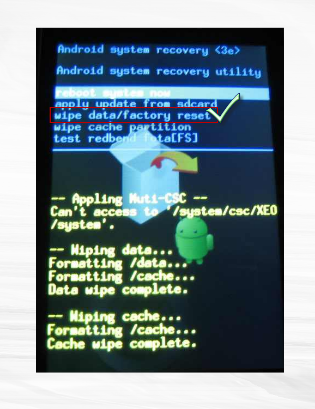
Now, another screen appears for confirmation. Just move down the cursor to “Yes” and again use the “Home button” to select.
There you have it, your mobile phone must reboot to its original settings and you can now access it without the need of your forgotten Pattern lock or security
Note: But all your data/app must be gone.
Congratulation youve success unlock your phone, please share this post to your friends.
Available link for download

Wednesday, May 31, 2017
How To Unlock Pattern Security Locked itel it1453 ITEL it1501 ITEL it1502 And ITEL it1503
How To Unlock Pattern Security Locked itel it1453 ITEL it1501 ITEL it1502 And ITEL it1503
Recently I have post about how to unlock itel it1501, but so many people have fail to unlock their locked android phone.
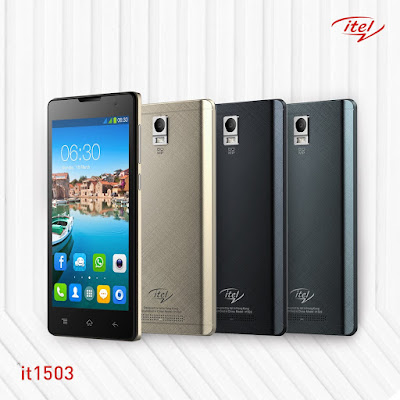
Here is the easy tutorial that will guide you to unlock your itel android phone successful, all itel from itel it1453, itel it1500, itel1501, itel it1502 and the latest itel it1503.
Firstly remove the battery of your then put it back again.
Then long press and hold the POWER KEY + VOLUME DOWN KEY together.
After it ON it will display iNote first, then after youve seen that iNote on the screen remove your hand on the phone and waait for a seconds.
It will display android recovery mode like youll see in the below picture.

Now Let go the business, to operate the recovery mode for unlocking your iTel.
Press Volume down key again to scroll down on WIPE DATA/FACTORY RESET like in the picture below.

Press or Use the Power key as OK to scroll down by using volume down key also.
Press power key again as OK.
Then scroll down to YES----DELETE ALL USRE DATA.
Use power key again as OK.
After that click on REBOOT SYSTEM NOW.
Now Cogratulation youve successful unlock your locked itel android smartphone 100% without using any softwares or tools.
Incase if you got any problem added my number 08067611897 via whatsapp messenger for more help.
Please share this info to your friends.
Available link for download
Thursday, May 11, 2017
How To Reset Or Unlock itel1501 Android Pattern Security Lock
How To Reset Or Unlock itel1501 Android Pattern Security Lock
Have you gotten same problem on your itel 1501 android device, pattern problem? If yes below are the solution about this.
I had a very suprising when i experience this with my friends itel android phone,he entered the wrong pattern on his phone sevral time and the phone got locked.
I had a very suprising when i experience this with my friends itel android phone,he entered the wrong pattern on his phone sevral time and the phone got locked.

when i got the phone i tried all sort of hard reset that i know,holding the: Power bottom a nd the volume+ simultaneously but nothing to display.
But now holding d the volume- key i.e volume down key and continues holding them till it display the recover mode.
First you will switch of your Android device. After switching it off your android device, press your volume down key.
Now press the power button and hold it too along. It will start a secret terminal interface.

Then press to use home button for scroll up and down. Then you will get to the choose option DELETE ALL USER DATA.
Select the option and wait Your device will take some few minute after finish it will restart and you will find out your android device has been unlocked.
Enjoy and share this to your friends via facebook and twitter together with google plus.
For more help contact me or added me on whatsapp messenger via: +2348067611897 ...
Select the option and wait Your device will take some few minute after finish it will restart and you will find out your android device has been unlocked.
Enjoy and share this to your friends via facebook and twitter together with google plus.
For more help contact me or added me on whatsapp messenger via: +2348067611897 ...
Available link for download
Friday, May 5, 2017
How To Format Hard Reset Tecno F5 Android Phone Pattern Lock Problem
How To Format Hard Reset Tecno F5 Android Phone Pattern Lock Problem
For those were using Tecno Mobile F5 Android Phone, if its hang or has a booting problem, one more problem you forget the pattern lock.

So I come the solution below that you can solve all this kind of problem by yourself.
There is two easy method to Format or Rese your Tecno F5 android.
First Method: Press or Tap the menu icon on the home screen of your phone.
1. Goto Settings, then click on all settings.
2. Now scroll down to Backup & Reset.
3. Click on Backup & Restore.
NOTE: If you want backup your data tick "Backup My Data".
4. Then Goto Factory Data Reset, it will erases all datas on your phone storage.
5. Now touch "Factory Data reset".
6. Then click on "Erases phone Storage" It will erase all the data on your phone storage, such as music,videos,photos,apps and even some important document all will be gone.
7. Click on "Reset Phone".
8. Now Confirm the process by selecting "Erase everything" now your tecno F5 will begin to start resetting itself.
Now youve successful reset your device and after finish it will restart.
Second Method: Its very simple if its lock too many pattern problem, just remove your battery and insert it back.
1. Now Press and hold the power On key + Upper volume key.
2. Continue holding them before your phone showing something like this, Use the volume key to move up and down then scroll down to “Restore Factory Defaults” or “Delete all User Data” depending on which is on your device. See the screenshot below.

After clicking on the settings above, now scroll down to “Reboot System Now ” and wait for your phone to reboot successfully.
Congrat your pattern was remove successful.
Please dont just read and go, take a minutes to share this to friends.
Available link for download
Sunday, April 16, 2017
How To Hard reset Remove Gionee M2 And Gionee M3 Pattern Locked
How To Hard reset Remove Gionee M2 And Gionee M3 Pattern Locked
Hi, Guys Do you want to remove pattern/security on your Gionee M2 and Gionee M3 android device to its original state? Don’t go to the mobile repair shop, Yes you can do this yourself.

Go through the below methods to unlocked/remove the pattern of your Gionee M2 and Gionee M3 android device.
- Watch Over 2,000 Free Dstv Channels on All Android & BB10 Phones
- How To Format/Hard Reset Tecno F5 Android Phone, Pattern Lock Problem
1. Switch off your device using Power Button.
2. PressVolume Down +Power button for a couple of some seconds.
3. Release pressed keys when you see an Android Recovery Mode.
2. PressVolume Down +Power button for a couple of some seconds.
3. Release pressed keys when you see an Android Recovery Mode.

4. Select the “Wipe data / Factory reset” by using theVolume buttons and press the Power key for confirmation.
5. Then choose “Yes–delete all user data“. UseVolume Down to scroll and Power button to select.
6. To restart the phone, select “reboot system now“.
7. Now youve Done!
- You Can Also Read More About All Android Device
Congratulation your phone has been successful unlocked without using any third party softwares.
If youve getting any problem you cantact us or drop your comment below.
You can also added me via Whatsapp messenger through this number +2348067611897 for more help.
If youve getting any problem you cantact us or drop your comment below.
You can also added me via Whatsapp messenger through this number +2348067611897 for more help.
Available link for download
Friday, April 14, 2017
Android Multi Tools Latest Version v1 02b All Pattern Lock Remover Free Download For Windows
Android Multi Tools Latest Version v1 02b All Pattern Lock Remover Free Download For Windows


selalu update :)
di gan update baru nya, di sini saya akan share rom yang paling gue suka :) dan yang memiliki tampilan keren gan yaitu rom MIUI v5 4.9.25(2015/01/03) dan ini juga sudah KITKAT gan
dari xiaomi gan langsung saja dah gan tanpa basa basi lagi dah,,
syaratnya yaitu :
- ace 2 sudah menggunakan android jelly bean atau cm 11 dan sejenisnya
- lakukan factory reset, wipe data/cache untuk stock rom
- jika rom sebelumnya costum rom cukup wipe cache aja gan tapi menurut saya lebih baik juga di factory reset gan
installasinya yaitu :
- siapkan bahan yang diperlukan yaitu :
- shutdown ace 2 sobat lalu masuk ke recovery mode caranya tekan volume UP + home + tombol power.
- di cwm recovery mode
- lalu pilih mounts & storage dan pilih format system
- lalu instal zip from sd card lalu arahkan ke file rom yang sudah di download tadi lalu pilih yes jika ada konfirmasi gan.
- lalu rebot ace 2 sobat :)
-ini kernel bagi yang mengalami bug, seperti blackscreen : download
-ini gan untuk novathor nya : download
-rom sudah di root tapi harus di enable terlebih dahulu yaitu : Security/Permissions/ROOT Permission
-default nya tidak bisa download file besar dari mobile data maka harus di disable yaitu di : Tools/Downloads/Settings/set to Unlimited
- untuk gapps/google play nya udah ada langsung gan dari rom nya :)
- untuk yang mau download gmail, ,map, dan sejenisnya tinggal download aj gan di google play nya.
ket : cara instalnya seperti biasa di CWM
- jika masih banyak yg mengalami error pada rom ini silahkan dicoba rom MIUI versi sebelumnya yaitu MIUI V5 4.8.8, cara instalnya sma seperti diatas dan tidak perlu lagi instal manual novathor nya, karna sudah ada didalam rom ini, download rom : DISINI
untuk yang mau lihat rom yang lain silahkan gan :
- MIUI v5
- rom carbon
- AOSB Project
- slimkat
- CM 10.2
- Liquid Smooth OFFICIAL
- Rom Ace2 Galaxy S4
- dark cyanogenmod 11
- cyanogenmod 11
- CrystalPA OFFICIAL
semoga berhasil gan thanks :)
jangan lupa tinggalkan komentarnya ya gan :)
- dan jangan lupa kunjungi lagi ya gan untuk lihat update terbarunya :)
Sumber : http://yogiaraii.blogspot.co.id/2014/06/miui-v5-baru-ace-2.html
Available link for download
Wednesday, April 12, 2017
How To Unlock Pattern iTel it1505 itel it1506 and it1507 Successful
How To Unlock Pattern iTel it1505 itel it1506 and it1507 Successful
Power Off the phone or remove th e battery press power botton while holding volume down key - immediatly release power key press and hold volume down key - simultaneously now you will see android recovery logo/mode.

Then scroll down to wipe/factory reset volume down to yes /// wipe data/factory reset.
Also press volume up to reboot the device.
Congratulation youve done resetting/formatting everything on your itel smartphone.
If you need more help you can call us or whatsapp this number 08067611897.
If you need more help you can call us or whatsapp this number 08067611897.
Available link for download
Friday, April 7, 2017
How To Unlock Infinx x510 x551 and Infinix x600 Security pattern Without Using any Softwares
How To Unlock Infinx x510 x551 and Infinix x600 Security pattern Without Using any Softwares
Hi, Guys today we are now talking about infinix mobile smartphone unlocking solution, here you can learn how to unlocked your infinix mobile successful without using any third party flashing softwares

Firstly youll switch OFF your phone because some of those infinix has inbuild battery no need to remove your battery safe.
Now How Can I Unlock my Infinix x551
Now Press and Hold Power key + Volume down at the same time, the devce will on and display Infinix.
After you seen that infinix logo on your screen then release all the keys and wait for some seconds.
Youll now seen this below:
Factory Mode
- Auto Test
- Manual Test
- Item Test
- Test Report
- Test Result
- Debug Test
- Clear eMMC
- Version
- Reboot
Nouse volume down key to scrol on Clear eMMC.
Use power key as OK.
The formatting will start like this "Formatting /data...".
Wait for a minute your phone will reboot.
Congratulation youve successful unlock your phone.
Please Share this post to your friends, also if youve any problem about unlocking your phone added my number via whatsapp messenger +2348067611897.
Available link for download
Thursday, April 6, 2017
Unlock Pattern Security Locked on iTel 1505 it1506 it1507 and it1508
Unlock Pattern Security Locked on iTel 1505 it1506 it1507 and it1508
Do you know the iTel android also have specific key combo for booting into recovery mode which is mostly needed whenever we need to factory reset or hard reset the phone. Here, I would discuss how to put your iTel 1505 android device in recovery mode for factory reset, soft format or for enabling USB Debugging on the iTel android phone even when the pattern is locked or password restricted.

Because iTel androids are SpreadTRUM androids, they have slightly different methods compare to other android devices like HTC, Sansung, Tecno amongst others which have specific key combo for booting into recovery mode from which you can perform a hard reset, factory reset, wipe user data or clean format the iTel android, itel it1506 to be specific.
How to Boot iTel 1505 to Recovery Mode and Hard Reset or Wipe
1. Power Off your iTel 1505,it1506, it1507 and it1508: either by removing the battery from the phone or by powering it off normally, the first thing you need to do is just power off the phone.
2. Press And Hold the Power Button for about 3 Seconds.
NOTE: Some iTel androids such as the iTel it1502 volume button should be pressed for up to 15 seconds at this stage.
2. Press And Hold the Power Button for about 3 Seconds.
NOTE: Some iTel androids such as the iTel it1502 volume button should be pressed for up to 15 seconds at this stage.
3. While Still Holding the Power Button, press and hold Volume Down (Volume -) Buttion for about 3 Seconds.
I.E Now, you should be pressing both Volume Down + Power Buttons together.
4. Now, release both buttons i.e Power Button and Volume Down button at once.
4. Now, release both buttons i.e Power Button and Volume Down button at once.
5. Shortly after releasing both buttons, an android icon shhould appear on your iTel 1505 screen. Now, press the Volume Up (Volume +) button.
If You Doesnt understand Watch this video now.
NOTE:
1. Use the Volume-up to navigate up.
2. Use the Volume-down to navigate down.
3. The Power button to select.
4. This methods have only been used for iTel 1408, 1505,it1506, it1507 and it1508.
5. I believe the same method should work with all iTel android devices thus; for booting all of them to recovery mode.
1. Use the Volume-up to navigate up.
2. Use the Volume-down to navigate down.
3. The Power button to select.
4. This methods have only been used for iTel 1408, 1505,it1506, it1507 and it1508.
5. I believe the same method should work with all iTel android devices thus; for booting all of them to recovery mode.
For more info about this tutorial just contact me direct via my whatsapp number...+2348067611897...
Available link for download
Wednesday, April 5, 2017
How to Unlock LG Optimus F6 Metro PCS Pattern Security Code Free
How to Unlock LG Optimus F6 Metro PCS Pattern Security Code Free
Now as I tell you Unlocking LG Optimus F6 MS500 is very easy, it is also safest and non-invasive method of unlocking your android phone.

How To Hard Reset LG MS 500 Optimus F6
1. In order to switch off your phone press and hold the Power rocker.
2. Afterwards press and hold Volume Down + Power button together for a couple of seconds.
3. Release held keys when the factory reset menu appears on the screen.
- You can also Read: How to unlock iTel it Smartphone without using any softwares

4. Confirm process by pressing Power key twice.
5. Now your phone should restart.
6. Success! The hard reset has just been completed.
Youve Done! And your phone was successful unlocked
Dont forget to share this post to your friends.
You can Contact Us if youve a problem.
Available link for download
Thursday, March 23, 2017
Easy Way To Unlock iTel it1507 it1507 and iTel it1702 Pattern Lock Without Using any Softwares
Easy Way To Unlock iTel it1507 it1507 and iTel it1702 Pattern Lock Without Using any Softwares
Assalam alaikum, Still I want to talk about iTel smartphones because I still recieve many complain in my facebook inbox and my mail box all about iTel unlocking. Many of the people are coming with security and pattern problem that is on itel smartphone.
So, today I still find a little time for helping my blog readers that are coming from various country in African continent, from Nigeria, Kenya, Tanzania, Ghana, Gambia, Zimbabwe, Somalia etc.
- Firstly switch OFF your itel phone
- Then Press the POWER KEY first and VOLUME DOWN KEY at thesame time.
- Within a second the iNOTE will display on your phone screen.
- Now Quick and release all the keys you held and leave the phone.
- You will see something like this "No Command." see the picture below.
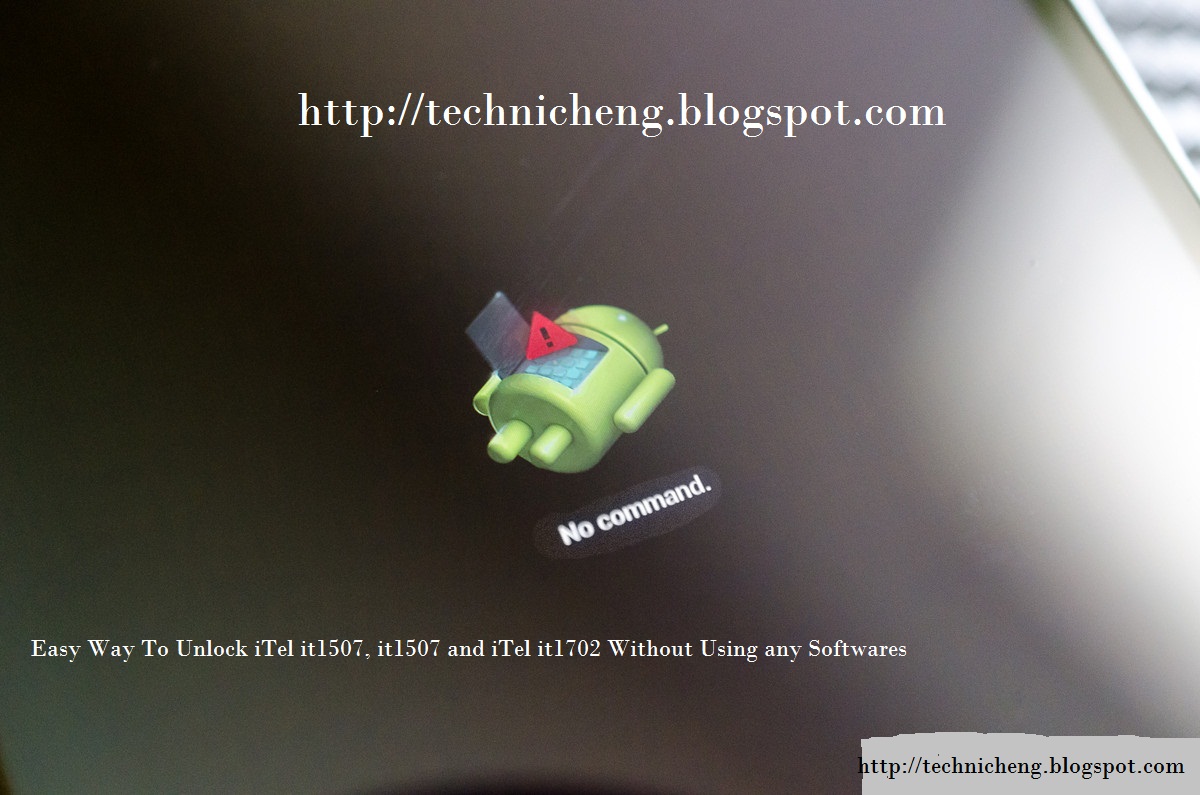
Now the recovery mode were display on the above photo.
Press the "VOLUME UP key" for iTel it1507 and it1506 you will see something like this in the picture below.
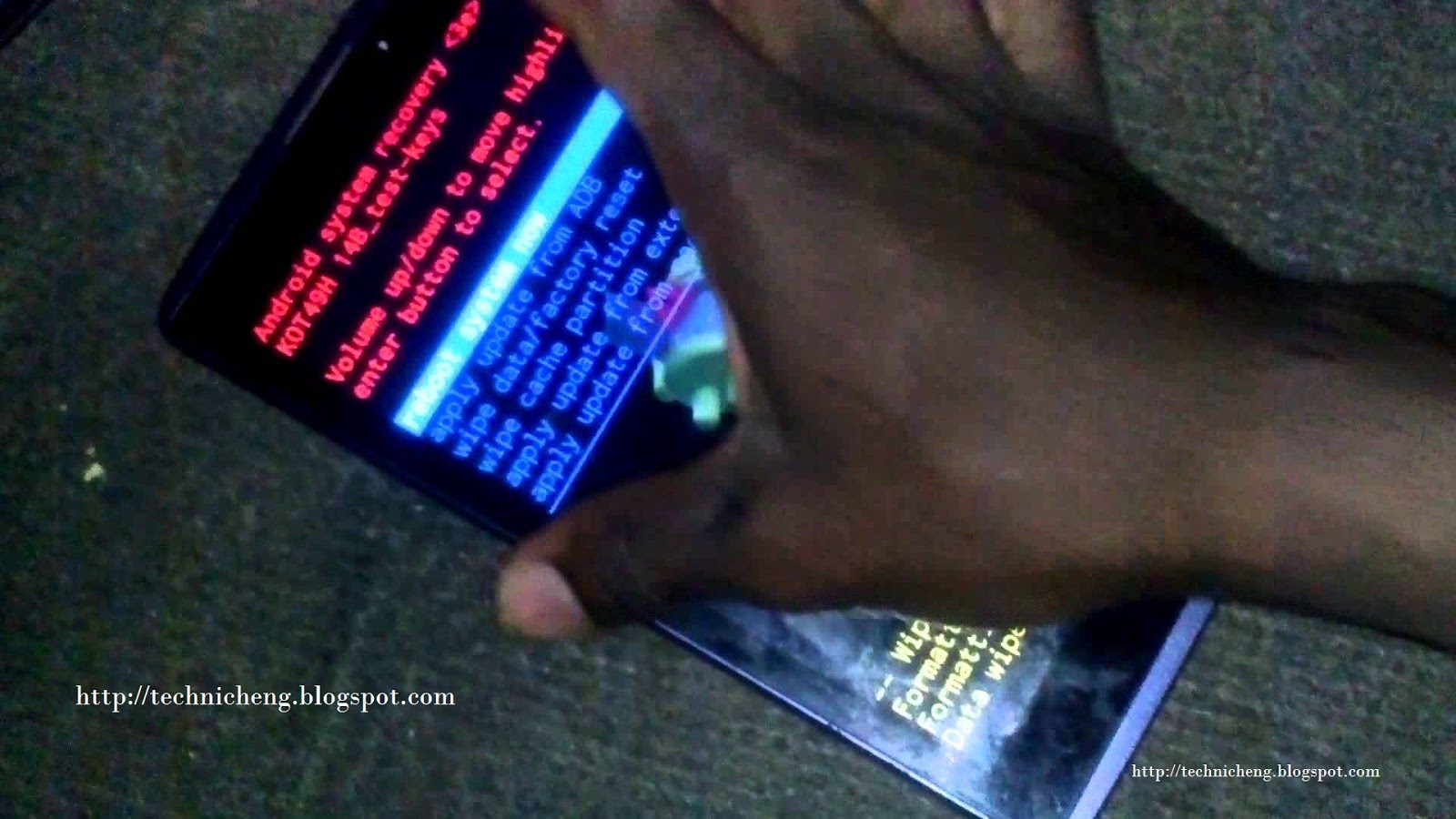
Now press Volume Down Key to scroll down on "WIPE DATA/FACTORY RESET" and press Power Key.
Now the formatting and Wiping data will start and wait for 1 - 2mins.
Press Power again on "REBOOT SYSTEM NOW"
Congratulation youve done resetting/formatting everything on your itel smartphone.
NOTE: This method normally work on few itel device like itel it1501, it1502, it1503, it1505, it1506, it1507, it1701 and it1702.
Hope this will help you guys and some students for unlocking your itel android phone, some that they dont have enough money to and unlock, you can use this tutorial working 100%.
If you can added this number +2348067611897 on your whatsapp contact for more help.
Available link for download
Subscribe to:
Posts (Atom)