Showing posts with label recovery. Show all posts
Showing posts with label recovery. Show all posts
Tuesday, May 16, 2017
Recovery TWRP Recovery v2 8 1 0 For Xolo Q1011
Recovery TWRP Recovery v2 8 1 0 For Xolo Q1011

TWRP Recovery v2.8.1.0 For Xolo Q1011
I search many time on Internet for custom recovery and custom Rom for Xolo Q1011. I request on many forums and to many developers but I didnt get any response from them. So I decide to learn about android Rom porting and compiling recovery, Kernel and many things about android development. Thanks to those developer who make tutorials for Rom developing and compiling and share with us. XDA is very very useful to me.
Lets go with the topic.
Here is the Latest version of TWRP Recovery for Xolo Q1011.
Features:-
-Fully touch version of Custom Recovery.
-Advance option to install custom roms.
-Very handy User Interference.
-Inbuilt File Browser.
-Multiple Reboot Option.
-Advance recovery options.
Screenshots


Download Link:-
TWRP Recovery v2.8.1.0 XOLO Q1011
Available link for download

Friday, May 12, 2017
How to Restore iphone iphad Without itunes in Recovery Mode
How to Restore iphone iphad Without itunes in Recovery Mode
In this topic referred to how you can recover your iPhone or iPad (or iPod Touch) when you have forgotten the passcode. With appropriate backups taken, you can easily restore your device and bypass the passcode requirement.
However, when you have never backed up your iDevice in iTunes (even once), chances of data recovery are very thin. There are, of course, some workarounds that you can explore.

If you have never backed up your iDevice in iTunes, it will not let you backup the device when it’s locked. Unfortunately, in this case, we’ve only got a locked and disabled iPhone that can only be restored as new via iTunes. The bottom-line is that you’ll lose your data. This will be apps, app data, contacts, photos, music and most of everything that resides on your iPhone/iPad.
ICLOUD TO THE RESCUE
May be if you’ve got iCloud sync and backup setup, the chances of finding all your app data, photos and contacts in iCloud are high. In that case, you can move ahead with the assurance that you can restore your iDevice from an iCloud backup and be up and running with almost everything.
If your iPhone is disabled due to incorrect passcode entry, you can use some other device – may be an iPad or another iPhone – to check out data that has been synced to your iCloud account. You can login to your Apple ID via Settings ? iCloud and then sync the device to see if contacts, mail, photos and other app data are available as a backup.
THE RECOVERY PROCESS:
When your iPhone is disabled, the only option you have is to restore it through iTunes.
LEARN HOW TO DO IT
- Connect your iPhone to the computer
- Open iTunes
- Select the iPhone (from the sidepane or from top-right of the screen)
- In the Summary tab, click on Restore
- If iTunes proceeds with a problem-free restore, your device will be wiped clean and restored as a new device. You can then carry on restoring it from an iCloud ID.
- If iTunes throws up errors, it’s time to go to Recovery Mode. Press and hold Power and Home buttons till iPhone goes into the blank state. (Black screen). Now connect the iPhone to iTunes and restore (iTunes will detect that a device is in recovery mode).
Pease share this to your friends.
Available link for download
Monday, April 24, 2017
Philz Touch Recovery for Xolo Q1011 Latest
Philz Touch Recovery for Xolo Q1011 Latest

Philz Touch 6.57.9
Philz Touch Recovery is ClockWorksMod based Recovery.
With a custom recovery we can do a lot of stuff and operations.
Features
1. Install custom ROM or flashable zip.
2. Install unsigned zip also with toggle md5 verification.
3. Install zip files from internal/external sdcard.
4. Install multiple zip files in a same time.
5. Change the look and interface of recovery GUI setting.
6. Backup your current rom and create update.zip from stock rom backup.
7. Create partition on SDcard.
8. Root your device with this recovery.
9. Take screenshot by touch and hold down for while then it will save the screenshot into the clockworkmod directory.
10. Changing the menu color and background.
Fully touch support and easy to use with great interference.
Screenshot


Philz Touch Recovery Xolo Q1011
Available link for download
Thursday, April 20, 2017
How to Enter Recovery Mode on Stubborn Android Mobile Devices
How to Enter Recovery Mode on Stubborn Android Mobile Devices
The truth is every new Android powered tablet / smartphone device is normally installed with a stock recovery image. The tool can be used by those who want to perform update operations, backup procedures and maintenance and optimization tasks. Well, if you want to obtain even more from your phone, of if you want to tweak its performances, then you can anytime replace the stock recovery with a custom recovery image, like CWM recovery or TWRP recovery . Of course for the custom tools you will have to root your device first.

==>Factory reset or system update your device.
==>Load your boot.img or update it from SD Card.
==>Update your system image or restore your back up from SD card.
==>Or perhaps if your device over misbehave and the only option you have left is to take it back to genesis,
How to Enter Recovery Mode on Stubborn Android Devices
Usually you can boot into recovery mode by:
==>Turn off you device.
==>Then, reboot by pressing the Power and Volume Up buttons simultaneously.
==>Keep the buttons pressed for a short while – a few seconds – and then release the same.
==>The recovery mode menu should be displayed.
==>Note: on Samsung branded devices the recovery mode can be entered by pressing the Power, Volume Up and Home buttons at the same time.
But, if the above method didn’t work out well for you, you can try the below
Method 1
1. You need to download an app on your smartphone.
2. So go to Google Play and download the Quick Boot tool; use the link from here for accessing the app.
3. Install the app on your phone / tablet. 4. Run the same.
5. You will be able to choose from: Recovery, Reboot, Bootloader and Power Off.
6. Choose Recovery. 7. Your device will reboot into recovery mode.
Method 2
1. On this method you will have to use ADB, so the Android SDK and Fastboot must be installed on your computer.
2. After installing the required tools (the one mentioned above) connect your device with the computer.
3. Use the USB cable for establishing the connection.
4. Then, on your computer navigate to the folder where Fastboot and Android SDK is installed.
5. There open a Command Prompt window.
6. For cmd: press Shift key on your PC + Right- click anywhere in the folder and choose “Open Command Prompt”.
7. Then, in the cmd window enter: “adb reboot recovery”.
8. Your smartphone / tablet will be automatically rebooted into recovery mode.
==>Factory reset or system update your device.
==>Load your boot.img or update it from SD Card.
==>Update your system image or restore your back up from SD card.
==>Or perhaps if your device over misbehave and the only option you have left is to take it back to genesis,
How to Enter Recovery Mode on Stubborn Android Devices
Usually you can boot into recovery mode by:
==>Turn off you device.
==>Then, reboot by pressing the Power and Volume Up buttons simultaneously.
==>Keep the buttons pressed for a short while – a few seconds – and then release the same.
==>The recovery mode menu should be displayed.
==>Note: on Samsung branded devices the recovery mode can be entered by pressing the Power, Volume Up and Home buttons at the same time.
But, if the above method didn’t work out well for you, you can try the below
Method 1
1. You need to download an app on your smartphone.
2. So go to Google Play and download the Quick Boot tool; use the link from here for accessing the app.
3. Install the app on your phone / tablet. 4. Run the same.
5. You will be able to choose from: Recovery, Reboot, Bootloader and Power Off.
6. Choose Recovery. 7. Your device will reboot into recovery mode.
Method 2
1. On this method you will have to use ADB, so the Android SDK and Fastboot must be installed on your computer.
2. After installing the required tools (the one mentioned above) connect your device with the computer.
3. Use the USB cable for establishing the connection.
4. Then, on your computer navigate to the folder where Fastboot and Android SDK is installed.
5. There open a Command Prompt window.
6. For cmd: press Shift key on your PC + Right- click anywhere in the folder and choose “Open Command Prompt”.
7. Then, in the cmd window enter: “adb reboot recovery”.
8. Your smartphone / tablet will be automatically rebooted into recovery mode.
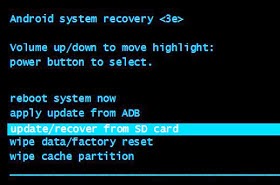
That’s it with recovery mode, let me take my seat while I sip my tea waiting for your questions.
- Here you can Learn how to hard reset all tecno android phone.
Available link for download
Thursday, April 13, 2017
MIUI 7 Global Stable ROM Downloads Recovery Fastboot
MIUI 7 Global Stable ROM Downloads Recovery Fastboot

MIUI 7 GLOBAL STABLE ROM FOR MI DEVICES
CREDITS OF POST GOES TO OFFICIAL MIUI FORUM
http://en.miui.com
Mi Pad - V7.0.2.0.KXFMICI
Download Fastboot ROM (570MB)
Download Recovery ROM (543MB)
Mi Note- V7.0.5.0.KXEMICI
Download Fastboot ROM (887MB)
Download Recovery ROM (711MB)
Mi 3 | Mi 4- V7.0.5.0.KXDMICI
Download Fastboot ROM (840MB)
Download Recovery ROM (665MB)
Redmi 2 (4G) / Prime - V7.0.5.0.KHJMICI
Download Fastboot ROM (828MB)
Download Recovery ROM (652MB)
Redmi Note (4G) - V7.0.5.0.KHIMICI
Download Fastboot ROM (866MB)
Download Recovery ROM (692MB)
Redmi 1S (3G) - V7.0.5.0.KHCMICI
Download Fastboot ROM (856MB)
Download Recovery ROM (682MB)


If you got any problem then contact us.
Available link for download
Sunday, March 26, 2017
TWRP Recovery for tecno L8 Plus
TWRP Recovery for tecno L8 Plus
Official Britney Spears - Make Me... / Me, Myself & I (Live from the 2016 MTV VMAs) ft. G - Eazy.mp3 Terbaru, Download Song Britney Spears - Make Me... / Me, Myself & I (Live from the 2016 MTV VMAs) ft. G - Eazy Video. More Related Songs
Lagu Britney Spears - Make Me... / Me, Myself & I (Live from the 2016 MTV VMAs) ft. G - Eazy (Full Album) - “Make Me” feat. G-Eazy is featured on "Glory", the ninth studio album from Britney Spears, OUT NOW!
Stream “Glory” on:
Spotify: http://smarturl.it/StreamBSG?IQid=yt
iTunes: http://smarturl.it/Glory?IQid=yt
Google Play: http://smarturl.it/BSGGP?IQid=yt
Amazon: http://smarturl.it/BSGAM?IQid=yt
Buy the deluxe album at Target: http://smarturl.it/GloryTarget?IQid=yt
Exclusive vinyl: http://smarturl.it/BritneyWebStore?IQid=yt
Stay in the know - sign up to Britneys mailing list: http://smarturl.it/BritneyMailingList?IQid=yt
Connect with Britney -
Facebook: http://www.facebook.com/britneyspears
Twitter: http://twitter.com/britneyspears
Instagram: http://www.instagram.com/britneyspears/
Google+: https://plus.google.com/+britneyspears
Tumblr: http://britneyspears.tumblr.com/
Website: http://www.britney.com
“Me, Myself and I” is featured on G-Eazy’s latest album "When Its Dark Out" Available Now! Get it on:
iTunes: http://smarturl.it/GEazyWIDO?IQid=yt
Stream on Spotify: http://smarturl.it/GEazyWIDOs?IQid=yt
Google Play: http://smarturl.it/GEazyWIDOg?IQid=yt
Amazon: http://smarturl.it/GEazyWIDOa?IQid=yt
Follow G-Eazy:
Facebook: https://www.facebook.com/G.Eazy
Twitter: https://twitter.com/g_eazy
Instagram: https://instagram.com/G_Eazy
Website: http://www.g-eazy.com/ [readmore]
We also have other in different categories. You can browse through the category and find your favorite. Or you can watch Lagu Britney Spears - Make Me... / Me, Myself & I (Live from the 2016 MTV VMAs) ft. G - Eazy (Full Album) on Youtube { http://www.youtube.com/watch?v=mGDeAWDNaZo }
 Or you can watch Lagu Britney Spears - Make Me... / Me, Myself & I (Live from the 2016 MTV VMAs) ft. G - Eazy (Full Album) on Youtube { http://www.youtube.com/watch?v=mGDeAWDNaZo }
Credits - Video
DMCA - Disclaimer
This video is shared by users. We dont upload the file, we just found on "youtube.com". We do not intend to infringe any legitimate intellectual, artistic rights or copyright. If you are the copyright owner for this file, please Report Abuse to "youtube.com" (source link) and if you liked this post, say thanks by sharing it.
Download : as (video) | as (video) | as (mp3)
Available link for download
Saturday, March 4, 2017
Nokia Software Recovery Tool Latest Version v6 3 56 Free Download
Nokia Software Recovery Tool Latest Version v6 3 56 Free Download
Official Didi kempot - Sewu Kuto.mp4 Terbaru, Download Song mp3 Didi kempot - Sewu Kuto Karaoke. More Related Songs
Didi kempot - Sewu Kuto - LIRYC - Perawan Kalimantan : https://www.youtube.com/watch?v=Jla1kM90ZOk
Stasiun Balapan : https://www.youtube.com/watch?v=xd8l_X4WL-Q
Tanjung Mas Tinggal Janji : https://www.youtube.com/watch?v=aGgstpdoxPo
Sewo kuto uwis tak liwati
Sewu ati tak takoni
Nanging kabeh
Podo rangerteni
Lungamu neng endi
Pirang tahun aku nggoleki
Seprene durung biso nemoni
Wis tak coba
Nglaliake jenengmu
Soko atiku
Sak tenane aku ora ngapusi
Isih tresno sliramu
Umpamane kowe uwis mulyo
Lilo aku lilo
Yo mung siji dadi panyuwunku
Aku pengin ketemu
Senajan sak kedeping moto
Kanggo tombo kangen jroning dodo
Wis tak coba
Nglaliake jenengmu
Soko atiku
Sak tenane aku ora ngapusi
Isih tresno sliramu
Umpamane kowe uwis mulyo
Lilo aku lilo
Yo mung siji dadi panyuwunku
Aku pengin ketemu
Senajan wektumu mung sedhela
Tak nggo tombo kangen jroning dodo
Senajan sak kedeping moto
Tak nggo tombo kangen jroning dodo [readmore]
We also have other in different categories. You can browse through the category and find your favorite. Or you can watch Didi kempot - Sewu Kuto - LIRYC on Youtube { http://www.youtube.com/watch?v=HU8_GMXoIcI }
 Or you can watch Didi kempot - Sewu Kuto - LIRYC on Youtube { http://www.youtube.com/watch?v=HU8_GMXoIcI }
Credits - Video
DMCA - Disclaimer
This video is shared by users. We dont upload the file, we just found on "youtube.com". We do not intend to infringe any legitimate intellectual, artistic rights or copyright. If you are the copyright owner for this file, please Report Abuse to "youtube.com" (source link) and if you liked this post, say thanks by sharing it.
Download : as (video) | as (video) | as (mp3)
Available link for download
Friday, March 3, 2017
Philz Touch Recovery 6 for Micromax Canvas Knite A350 Recovery Latest
Philz Touch Recovery 6 for Micromax Canvas Knite A350 Recovery Latest

Philz Touch Recovery for Micromax Canvas Knite (A350)
Features
1. Install custom ROM or flashable zip.
2. Install unsigned zip also with toggle md5 verification.
3. Install zip files from internal/external sdcard.
4. Install multiple zip files in a same time.
5. Change the look and interface of recovery GUI setting.
6. Backup your current rom and create update.zip from stock rom backup.
7. Create partition on SDcard.
8. Root your device with this recovery.
9. Take screenshot by touch and hold down for while then it will save the screenshot into the clockworkmod directory.
10. Changing the menu color and background.
Fully touch support and easy to use with great interference.


Download Link
Philz Touch Recovery Micromax A350
Available link for download
Subscribe to:
Posts (Atom)