Showing posts with label lolipop. Show all posts
Showing posts with label lolipop. Show all posts
Wednesday, May 31, 2017
CUSTOM ROM LOLIPOP UI Based KITKAT 4 4 2 for XOLO Q1011
CUSTOM ROM LOLIPOP UI Based KITKAT 4 4 2 for XOLO Q1011

LOLIPOP UI CUSTOM ROM FOR XOLO Q1011
Many user want and request for a custom ROM for Xolo Q1011 even I also. I search for that on many of sites but result is 0. So Ive decide to port a custom ROM for my Xolo Q1011 own. After a lots of study on porting ROM, Kernel, Recovery and many other useful things, I ported the ROM for Xolo Q1011. Finally here is the result.

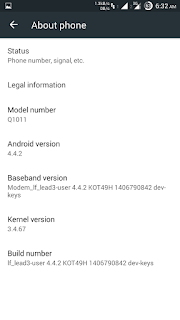
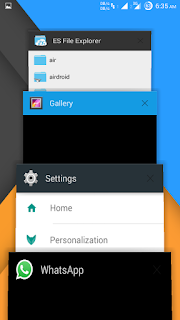
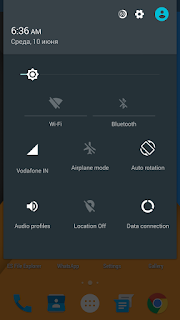

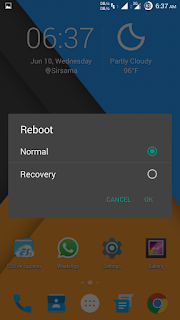

Features:-
Lite user interface and slick design.
LOLIPOP UI design panels.
Less battery uses by apps and system.
Best in performance and no lags.
Note:- Only flash with custom Recovery like CWM or Philz or TWRP. And must me have a rooted device.
Procedure:-
1. Copy zip file into your External SD card.
2. Boot your phone in recovery mode. Power off your device and press VOLUME+ and Power button simultaneously.
3. Now wipe delvik cache and wipe cache.
4. Now Click on install zip then install zip from sdcard.(External SD card)
5. Now it start flashing the ROM. wait for a while and its finished then reboot your phone.
Enjoy Custom Rom Lolipop Taste.
LOLIPOP UI Custom ROM for XOLO Q1011
DownloadAvailable link for download

Monday, April 17, 2017
Custom ROM OctOS Lolipop 5 1 1 for XOLO Q1010i
Custom ROM OctOS Lolipop 5 1 1 for XOLO Q1010i

OctOS Lolipop 5.1.1 for Xolo Q1010i
Creadits
Team OctOs
http://www.teamoctos.com
Based on cyanogenmod 12.1
Working:-
- Calls, Dual SIM, Data only SIM1)
- Wifi
- GPS/A-GPS
- Sound
- Camera (Only Photos)
- Bluetooth
- Sensors
- 1080p Video Playback
- Notification Led
Known Bugs
- Sound Recorder Can not access to microphone (Set format to "WAV")
- USSD (Is only working for some carriers)
How To Install
- First install custom recovery.
- Then reboot into recovery by pressing VOLUME UP + POWER.
- Wipe Cache and Data or Factory Reset.
- Now Install Zip of Custom Rom.
- Reboot and enjoy.
- TEAM OcToS
- Cyanogen
- EquiNox Team MediaTeK
Contributors
Equinox Team Mediatek ujwal.p, moonrotation, ricky_adhitya,
Equinox Team Mediatek ujwal.p, moonrotation, ricky_adhitya,
Source Code: http://www.github.com/Team-OctOs
ROM OS Version: 5.1.x Lollipop
ROM Kernel: Linux 3.4.x
Based On: cyanogenMod
ROM OS Version: 5.1.x Lollipop
ROM Kernel: Linux 3.4.x
Based On: cyanogenMod

DOWNLOAD
G-Apps 5.1.xx
Download For Xolo Q1010i [Google Drive Link]
Available link for download
Monday, March 20, 2017
Give Lolipop Look to your Smartphone without installing ROM KK JB
Give Lolipop Look to your Smartphone without installing ROM KK JB

Customize your android mobile with Material design UI and give looks of Lolipop Rom without installing or flashing a custom rom or without affecting any apk. This customization only patch the framework-res.apk of device to change the UI of device.
Xposed Installer
Xposed is a framework for modules that can change the behavior of the system and apps without touching any APKs. Thats great because it means that modules can work for different versions and even ROMs without any changes (as long as the original code was not changed too much). Its also easy to undo. As all changes are done in the memory, you just need to deactivate the module and reboot to get your original system back. There are many other advantages, but here is just one more: Multiple modules can do changes to the same part of the system or app. With modified APKs, you to decide for one. No way to combine them, unless the author builds multiple APKs with different combinations.
Note:- This only works with root access on Android 4.0.3 or later.
GravityBox [KK]
GravityBox is a module which primary goal is to provide the users of AOSP devices
with a tweak box to turn their vanilla AOSP ROM into custom ROM packed with additional features and tweaks
without need to flash anything. Most of the preferences can be changed on-the-fly without rebooting.
Main features
- QuickSettings tile management with additional tiles and tile reordering
- CyanogenMod Pie Controls
- Lockscreen targets
- Expanded desktop with semi-immersive and immersive modes
- Lockscreen tweaks
- Statusbar tweaks
- Navigation bar tweaks
- Power tweaks
- Display tweaks
- Media tweaks
- Hardware key actions
- Dialer tweaks
- Launcher tweaks
- Screen recording
- Smart radio
- Notification control (per-app notification LED/sounds/vibrations)
... and many more
- QuickSettings tile management with additional tiles and tile reordering
- CyanogenMod Pie Controls
- Lockscreen targets
- Expanded desktop with semi-immersive and immersive modes
- Lockscreen tweaks
- Statusbar tweaks
- Navigation bar tweaks
- Power tweaks
- Display tweaks
- Media tweaks
- Hardware key actions
- Dialer tweaks
- Launcher tweaks
- Screen recording
- Smart radio
- Notification control (per-app notification LED/sounds/vibrations)
... and many more
Compatibility
- Supports AOSP devices running vanilla Android 4.4
- Supports Motorola Moto G Dual SIM running stock KitKat
- Supports ThL 5000 running stock KitKat and potentially other MediaTek devices running pure MediaTek ROMs
- DOES NOT support devices running ROMs vastly modified by device manufacturers (HTC Sense, Samsung Touchwiz, MIUI, LeWa, Xperia, ...)
- SHOULD NOT be used with custom ROMs like CM, AOSPA, RootBox, SlimBean and others - it makes no sense since the most of the features are already
in the ROM (may cause conflicts and unexpected behavior)
- Supports AOSP devices running vanilla Android 4.4
- Supports Motorola Moto G Dual SIM running stock KitKat
- Supports ThL 5000 running stock KitKat and potentially other MediaTek devices running pure MediaTek ROMs
- DOES NOT support devices running ROMs vastly modified by device manufacturers (HTC Sense, Samsung Touchwiz, MIUI, LeWa, Xperia, ...)
- SHOULD NOT be used with custom ROMs like CM, AOSPA, RootBox, SlimBean and others - it makes no sense since the most of the features are already
in the ROM (may cause conflicts and unexpected behavior)
Screenshots:-


Procedure:-
-Install Xposed Framework and open app.
-Then click on framework tab and click on install.
-Reboot Device and install Gravity Box[KK].(For JB there is other version)
-Set Gravity Box tweaks as yo want.
Enjoy....
Download Link:-
Gravity_Box[KK]_v3.5.10-stable.apk - 4.2 MB / Mirror
Gravity_Box[JB]_v3.5.8-stable 4.0mb / Mirror
Android.Xposed.Installer_v2.6.1-stable.apk - 712 KB / Mirror
Android.Xposed.Installer_v2.7-Experimental.apk - 770 KB / Mirror
Gravity_Box[JB]_v3.5.8-stable 4.0mb / Mirror
Android.Xposed.Installer_v2.6.1-stable.apk - 712 KB / Mirror
Android.Xposed.Installer_v2.7-Experimental.apk - 770 KB / Mirror
Available link for download
Subscribe to:
Posts (Atom)