Showing posts with label blogger. Show all posts
Showing posts with label blogger. Show all posts
Thursday, May 25, 2017
How to show or display adsense ads on mobile version for blogger blogspot
How to show or display adsense ads on mobile version for blogger blogspot
Here Is a new one i discovered in making your adsense apply in your blogger mobile view in the new developed blogger.
WHY I RECOMMEND YOU GET THIS ADDED?
Well as for those of us that really want to earn with our blog sites or websites,you get to see that on your mobile template your adsense system is not visible and most of your blogs pages view trafficate from mobiles since these days the rate at which people use the mobile devices increases and the rate at which people use the pcs reduces and you keep wondering how do i get click on my adsense gadget when its not visible on my traffic sources coming from mobile?..well if thats the case heres a solution to that with this method you can add your adsense system to your blogger mobile view or better still add enough widget to your blogger mobile view, like the likes of popular post,blog archive,receive latest post via email...all of this gadgets you can make them visible on your mobile view of your blog Now lets get it started already.
WHY I RECOMMEND YOU GET THIS ADDED?
Well as for those of us that really want to earn with our blog sites or websites,you get to see that on your mobile template your adsense system is not visible and most of your blogs pages view trafficate from mobiles since these days the rate at which people use the mobile devices increases and the rate at which people use the pcs reduces and you keep wondering how do i get click on my adsense gadget when its not visible on my traffic sources coming from mobile?..well if thats the case heres a solution to that with this method you can add your adsense system to your blogger mobile view or better still add enough widget to your blogger mobile view, like the likes of popular post,blog archive,receive latest post via email...all of this gadgets you can make them visible on your mobile view of your blog Now lets get it started already.
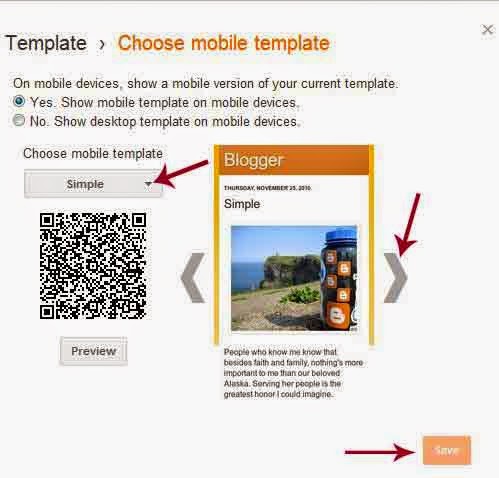
1. Now before anything we need to learn how to locate a widget on your blog...locating a widget helps us find the widget id of whatsoever gadget we wish to add to our blogger mobile view so in other words we need to know the location of the widget before we proceed to adding the visibilities on our mobile blog view same goes for adsense gadgets we need to no the widget id of our adsense gadgets before we can be able to make it visible on our mobile blogs view..
HERES HOW TO LOCATE A WIDGET ID ON YOUR BLOG NOTE : For you to be able to make your adsense visible in mobile you must already know how to locate WIDGET ID OF YOUR ADSENSE so if you dont no how to do that i strongly recommend you read the post above.
2. Now the key to adding gadget and adsense on your blog are just three html codes involved if you are not perfect in css codes they are mobile=yes, mobile=no, mobile=only.
3.This are the html keys to adding gadgets and adsense widget to your mobile view ....without wasting much time and talking.
4. After you have successfully located your widget id, ike in the image below include whichever function you want it to be on your mobile template...if you want any adsense to be on mobile only just input mobile=only if you want it to be visible on both your mobile view and your desktop view just input mobile=yes if you dont want a gadget or an adsense to be visible on your mobile view just input mobile=no
5. Now when you are done click Save template and go to your previous page when you there click the gear indicator under the mobile view.
You can also Join our facebook group discussion for more latest news about tech together with some mobile and pc tips and tricks.
Available link for download

Monday, April 24, 2017
Get Any Blogger Blog Template Design For N1 000 Only
Get Any Blogger Blog Template Design For N1 000 Only
Get Any Blogger Blog Template / Design For N1,000 Only.
1. I designed this blog mobile view, while learning the intrigues of the platform, to be similar to donejeh.com and later kudantown.blogspot.com, a blogger blog.
1. I designed this blog mobile view, while learning the intrigues of the platform, to be similar to donejeh.com and later kudantown.blogspot.com, a blogger blog.

2. Ill build a blogger template with design similar to any blogger blog you point at, be it premium or not, responsive or non- responsive, for a token of Thousand Naira (N1,000.00 ) Only. You get to pay after the template is designed and a demo shown to you.
The design may take one or two days to complete depending on its complexity.
3. Ill send you the Bank account details to pay into once the template is completed. Please, besides the consultancy fee, I also accept payment by Recharge card (Airtime) or in Kind for this service. After payment has been made, the template will be sent to you.
The design may take one or two days to complete depending on its complexity.
3. Ill send you the Bank account details to pay into once the template is completed. Please, besides the consultancy fee, I also accept payment by Recharge card (Airtime) or in Kind for this service. After payment has been made, the template will be sent to you.
4. But if you dont know how to upload templates on blogger, Ill help you to do so (no extra charge).
5. If you wish to take advantage of this service, simply send a mail containing your blog address (intented to be re-designed) as well as the blog address whose design you want to Absonsfriend2@gmail.com.
5. If you wish to take advantage of this service, simply send a mail containing your blog address (intented to be re-designed) as well as the blog address whose design you want to Absonsfriend2@gmail.com.
You can also contact me directly or via whatsapp messenger through this number 08067611897.
Available link for download
Saturday, April 22, 2017
How To Setup ga tk cf ml gq Free domain on your Blogger blogspot
How To Setup ga tk cf ml gq Free domain on your Blogger blogspot
Today i wanna talk about how you can host your blogspot to any of this format, .TK .CF .GA .ML .GQ its very easy to it yourself. Are you feeling that your long domain name like your-webname.blogspot.com, giving you bad reputation at many points of view? If your answer is yes! Then you came to right place and read out my post.
Why should I change to custom domain?
Search engines except Google, rest of all will never result your blogspot well at their listing. Social networking sites don’t like your blogspot.com tag when compared with top level domain. They don’t love to back link you. Moreover, the blogspot.com domains are blocked by some Internet service providers including China. You can also get custom e-mail like admin@your-domain.com with Google Apps. So this time, I am posting step by step guide to set up various custom domain using freenom like .gq, .ga, .tk, .cf, .ml, etc.
Guide to set up a Freenom (.gq .ga, .cf, .ml, .tk) custom domain using free DNS service:
Registering Freenom Domain:
1. Go to Freenom.com website.
2. Enter your preferred Freenom domain name and click Go. If entered domain is available, you will be promoted for further steps.

Now it shows availability of your domain. For free domain you need to produce minimum of 25 hits per 90 days. Free domain has same services as paid domain. Select your choice and move on to next step.

Enter your blogspot URL and set registration length as 12 months. Now sign up with Freenom. Here you have to verify your Freenom account by email or you can also use social Networking accounts like facebook, yahoo, flicker etc.
Now Setup your Freenom in Blogger:
Login to your blogger account.
Go to Settings and find Publishing option in your dashboard. Now click on Add a Custom Domain. You will be prompted to buy a domain for your blog.

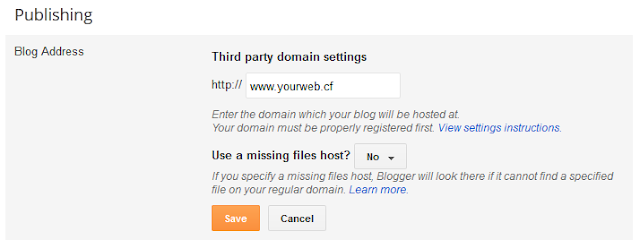
Simply click on + Setup a 3rd party URL for your blog. Then enter your Freenom domain with www in the place of www.yourwebname.cf (as shown in the picture). Now you have to verify domain ownership by adding two CNAME records. For this, click on Save. You will see error like this CNAME values with detailed set up instructions.

Dont panic its justa instruction for Domain setup.
Now Setup DNS Configurations in your Freenom Account:
Now log on to your Freenom account and click on My Domains. It gives the list of your all Domains. Now, click on Manage Domain.

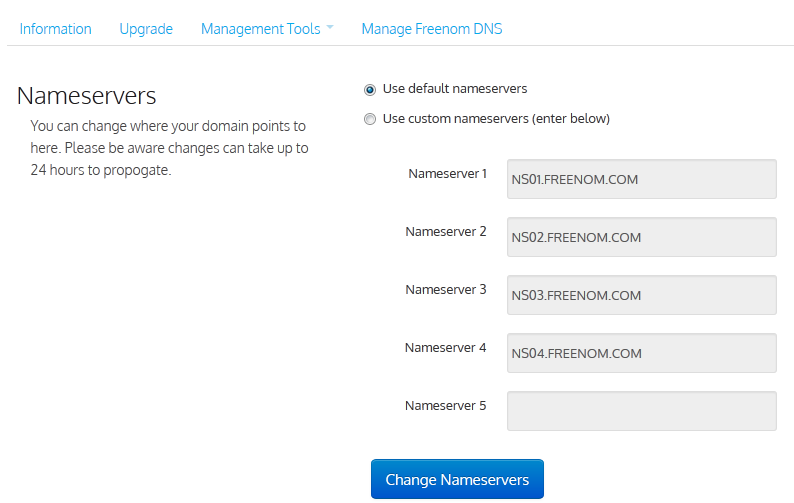
Now click on Management Tools > Name Servers.

Use Default Name Servers > Change NameServers.
Manage Freenom DNS option to configure DNS Settings for your domain.
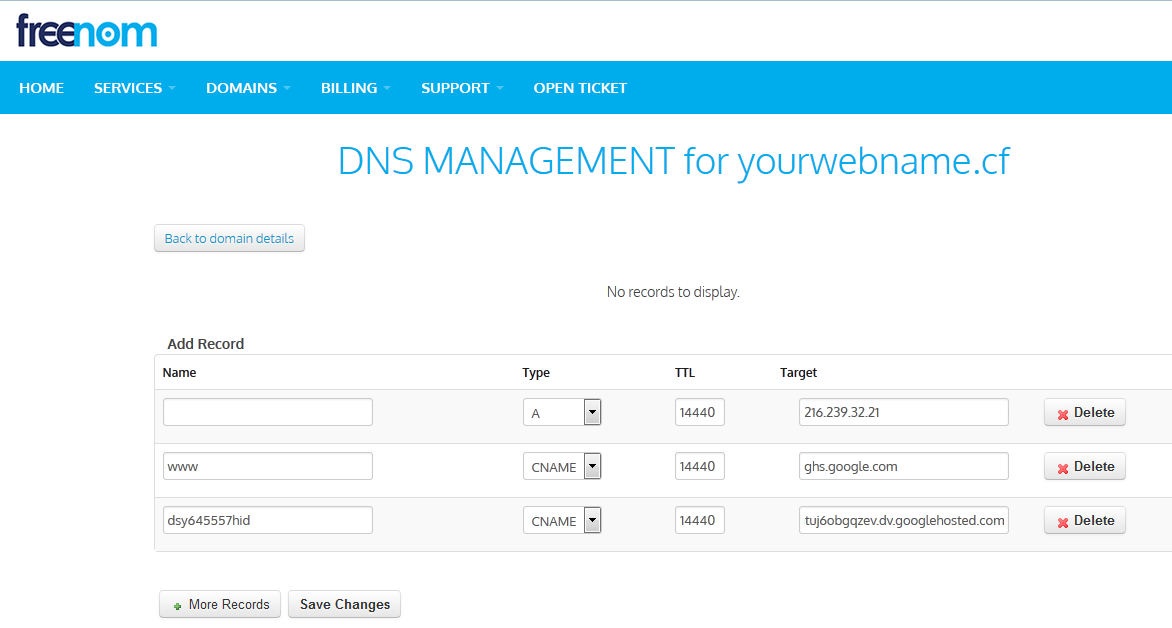
Note: 1st fill up line will be Default by A and 216.239.32.21 , for the 2nd and 3rd line fill up from the error from STEP II > Instruction 3. By the way 2nd and 3rd line will be CNAME
Before you move onto next step, wait about 30 min or an hour for your DNS settings to activate. ( My Suggestion: wait 2/3 minute :p instead of 30). Then hit the Save button.
Now Saving Your Custom Domain settings in Blogger:
Again go to domain settings then ? tick the option Redirect yourwebname.ml to www.yourwebname.ml and save settings.

For easy understanding watch this video now it will help you more.
If you have any trouble in following any of the steps, you can drop comment in the comment section or CONTACTING US now.
If you have any trouble in following any of the steps, you can drop comment in the comment section or CONTACTING US now.
Enjoy please share this post to your friends.
Available link for download
Thursday, March 30, 2017
Must Read 10 SEO Benefits of using Blogger Simple Template
Must Read 10 SEO Benefits of using Blogger Simple Template
Here is the 10 SEO Benefits of Using blogger simple template,how to convert simple template into the best seo optimized blogger template.
Are you searching:- What is the best seo optimized template for blogger or finding a template that is good from google point of view and will bring you lots of traffic or you want a template which has developed with all best on page optimization tactics.Than do not worry you are on the right page ,you will find your solution here.
Template Plays an important role in bringing traffic : Yes a template has also a great role in bringing traffic for your blog.because if you have used all on page optimization tactics than it will be very helpful in appearing in google search results. i accept that still content is king but what will you do of those content if it is unnoticed by search engines.now the main part comes under the light .your on page optimization tactics enforces search engines like google to index your content and such on page optimization is needed for blogger templates.so now the questions is where and how to find such template.well in reality you do not have to find it.you already have it.

Which is the Best SEO optimized blogger template :
Blogger default template is best seo optimized template it just needs few customization and after that it will totally change your traffic.well i have done this in my other blog and i will share its report with you what happened after such customization.you will read in my nest post what are those customization which converted a simple blogger template into best seo optimized template and what are the real benefits of simple blogger template.
Why not to use third party templates and why to use blogger default simple templates.
Extra Load of javascript
First free from other third party javascripts.if you use someone elses template .he will for sure insert his websites link in template .either in footer or somewhere else.and then if you use that template ,you are direcly giving backlink to his template.so always use official blogger template.and any template which has too much javascript in that it will create problems for search engines to index.so try to keep your template from too much javascript and avoid such unnecessary javascript.but id you use blogger simple template you will be free from unwanted dangers and insecurity of stealing username and passwords.
Hidden javascript
To understand the blogger template you need to have knowledge of XML.and in relaty very few bloggers know that and other use as a reference to them for their knowlegde.so what are they inserted in that template you also do not know that may be that they have such javascript whicch is getting all of your details like username or password because in such technical advancement period nothing is impossible.and i have seen on google groups stealing of username and password after using third party templates.but if you prefer blogger simple templates you can be assured of authenticity.
Size,Load time Average speed per KB.
Third party template inserts lots of css and javascript to make it attractive and hence it leads to more increased page size and hence increase page loading speed.if you see any successful blog or website you will see very less page size.here is the example of few websites which are very popular and have great traffic but their page size is too small and page loading speed is also short.which proves my statement.below is the list.
Now tell me so you still think of using third party template.if not than read my next post where i will share how i increased my blogs traffic 3 times using on page optimization tactics.
Incoming search terms
Which is the best seo optimized template for blogger,best blogger seo optimized template,best blogger templates,should i use third party template,blogger simple template,benefit of blogger simple template,which is the best blogger template,best blogger templates,blogger template,how to convert simple template into seo template,best blogger seo template.
Enjoy and share to your friends...
Available link for download
Subscribe to:
Posts (Atom)